
Choose content creators in a public request
On this page
When you activate a public request, content creators who meet your requirements see it in Opportunities and apply. You review the applicants and choose enough to fill the spots you requested.
Who can apply
Only content creators who meet these criteria can apply:
- They have the minimum level you chose or a higher one.
- They meet the gender and country targeting criteria, if you activated them.
- They have the networks you ask them to publish on active, if you requested publication.
- They have a complete profile, with at least two videos in their portfolio.
When applying, the content creator leaves you a message explaining why they are a good fit and accepts the brief and the rights assignment agreement. Each content creator can apply only once to each request.
Review the applicants
In My requests, the request card shows how many applicants it has. Click View applicants or open the request and go to the Applicants tab. On each card, you’ll see the content creator’s profile, their message and the total price per content creator; if they are a higher level than the minimum, you’ll also see the additional charge.
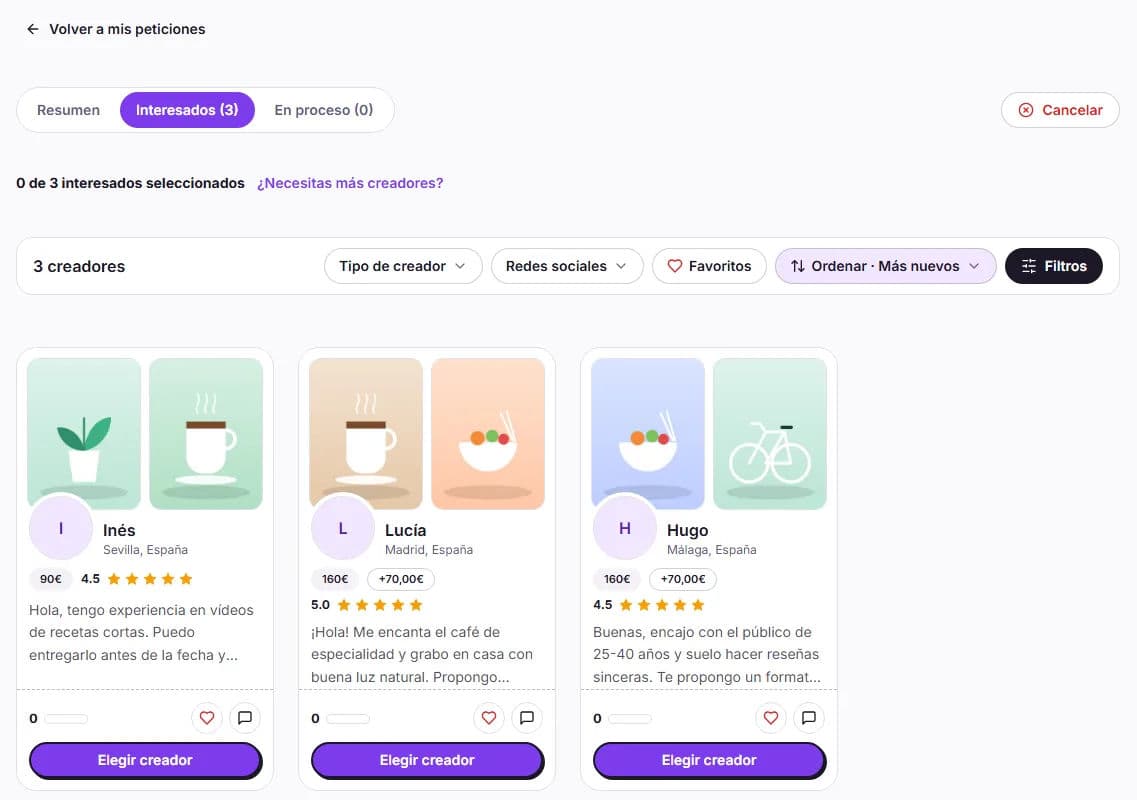
You can filter the list using the same filters as in the content creator explorer and open each profile to view their portfolio and reviews. We don’t send you an email for each application, so check in from time to time.
Chat before choosing
With the Chat button for each applicant, you can resolve questions or discuss your idea with them before deciding. Until you select them, messages containing emails, phone numbers or links are not sent.
Confirm your selection
Choose the content creator
Click Choose content creator on their card.
Review the price
In Confirm selection, you’ll see the final price. If the content creator is a higher level or their publication fee is higher, you’ll see the Additional total, the Balance applied and, if your balance isn’t enough, the Stripe payment.
Confirm
Click Confirm selection, or Confirm and pay if there is an outstanding amount. The content creator receives a notification and moves to In progress: you can now coordinate the details by chat.
Spots, applications and open requests
- You can choose as many content creators as the request has spots. The summary shows how many spots you have filled.
- There is no button to reject applications: anyone you don’t choose is simply not selected.
- The public request does not expire. It remains in Opportunities until you fill all the spots and moves to Completed when all collaborations have been approved.
Do you need more content creators?
In the request summary, click Do you need more content creators? and then Add more content creators. Choose how many spots to add (up to 100 in total), see the price per spot and pay with your balance or by card. The brief does not change.
Once you’ve chosen them, manage each collaboration from My requests. If applications are slow to come in, see what it depends on.