
HICARI Workspace
On this page
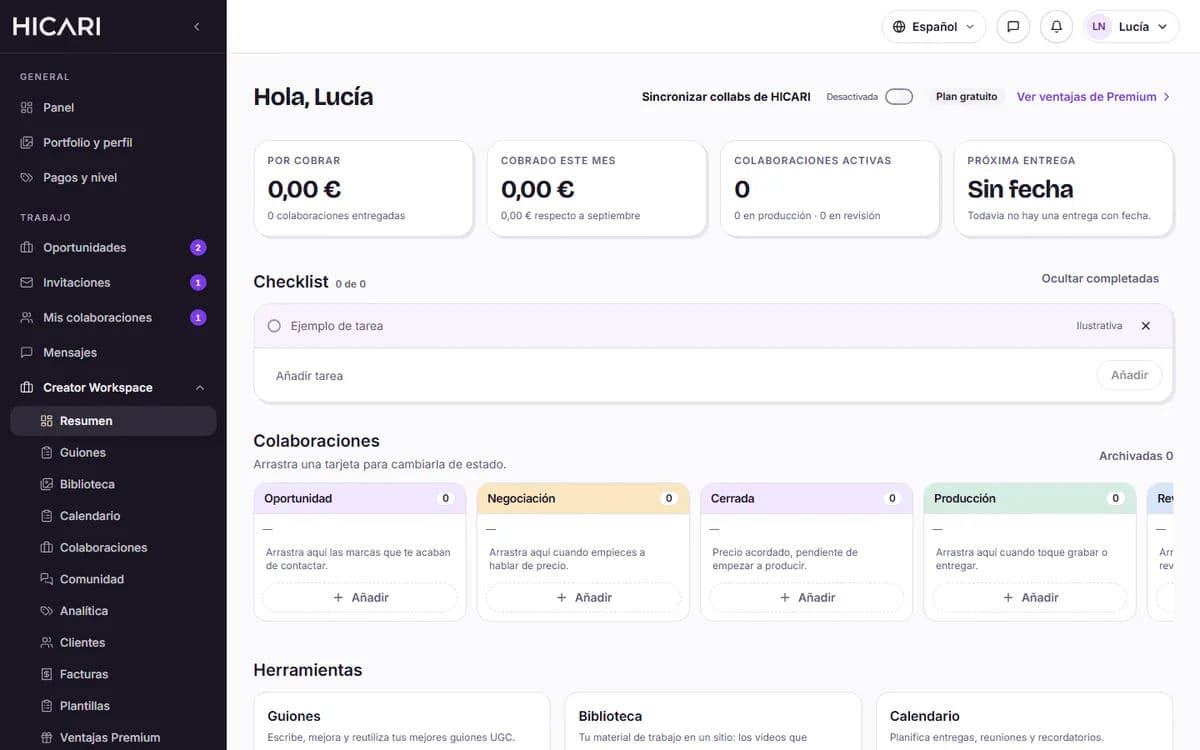
HICARI Workspace is your private workspace within HICARI: organize your collaborations (those from HICARI and those you get on your own), your scripts, your files and your dates all in one place. It has a free plan and an optional Premium plan.
On the website, you’ll find it as Creator Workspace in the menu; in the app, in the Workspace tab.
What you can do
- Collaborations: your HICARI collaborations appear automatically, and you can add those you arrange outside HICARI with other brands.
- Scripts: write and save your scripts, and link them to each collaboration.
- Library: raw videos, briefs and brand files, all organized.
- Calendar and checklist: delivery dates and pending tasks.
- Community: text channels to talk to other creators.
Everything is private: brands and other creators cannot see your library, your rates or your client profiles.
Free and Premium
| Feature | Free | Premium |
|---|---|---|
| Collaborations | With a monthly limit on new collaborations | No limit |
| Scripts | Unlimited; only the latest version is saved | Full history and an AI assistant that writes in your style |
| Library | 2 GB (up to 200 MB per file) | 100 GB (up to 2 GB per file) |
| Calendar and checklist | Included | Included |
| Community | General channel | VIP channel and extra channels |
| Clients, Invoices, Templates and Analytics | No | Included |
If you reach the free monthly limit, we’ll let you know; to create more collaborations that month, you need Premium.
How much does Premium cost
You can see the Premium price under Premium benefits, within HICARI Workspace, or in the app. You can pay monthly or annually (the annual plan is discounted), and the price includes VAT. No minimum commitment.
How to subscribe
- On the website: by card, through a secure payment with Stripe, or with your Wallet balance. If you pay with your wallet and don’t have enough balance on the renewal date, the subscription is canceled.
- In the app: with your App Store or Google Play account.
Each subscription is managed where you subscribed.
How to cancel
- If you subscribed on the website: go to My subscription and click Cancel subscription.
- If you subscribed in the app: from your App Store or Google Play subscription settings.
You keep Premium until the end of the period you’ve already paid for. When it ends, nothing is deleted: your scripts, files and collaborations remain there. Premium features are disabled; for example, you can view your invoices and clients, but you can’t create new ones.
Do I need Premium to find work on HICARI?
No. With the free plan, you can apply for opportunities and receive invitations just the same. Premium adds tools to help you stay organized and more storage.
Can I use Workspace with brands outside HICARI?
Yes. You can add external collaborations, their scripts and their files. HICARI collaborations sync automatically.
Where can I see my plan and how do I change my payment method?
Under My subscription (website), you can see your plan, change your payment method or switch to the annual plan. If you subscribed in the app, it’s managed through the App Store or Google Play.