
Selecting creators for your campaign
On this page
In a campaign, creators apply and you decide who participates. No one joins your campaign unless you choose them, and you can talk to each candidate before deciding.
Who can apply
You will only see applications from creators who meet the requirements you specified in the brief:
- A level equal to or higher than the minimum you chose.
- The campaign’s social media accounts active on their HICARI profile.
- The targeting, if you enabled it (gender and country).
- A complete profile, with at least 2 videos in their portfolio.
When applying, each creator writes you a message and accepts the usage rights assignment agreement, so you do not have to negotiate anything separately.
Review the candidates
Go to My requests, open your campaign and go to the Interested tab. You can filter and sort candidates just as in the creator explorer: by social media accounts, location, age, languages, Most followers or Highest score, among others.
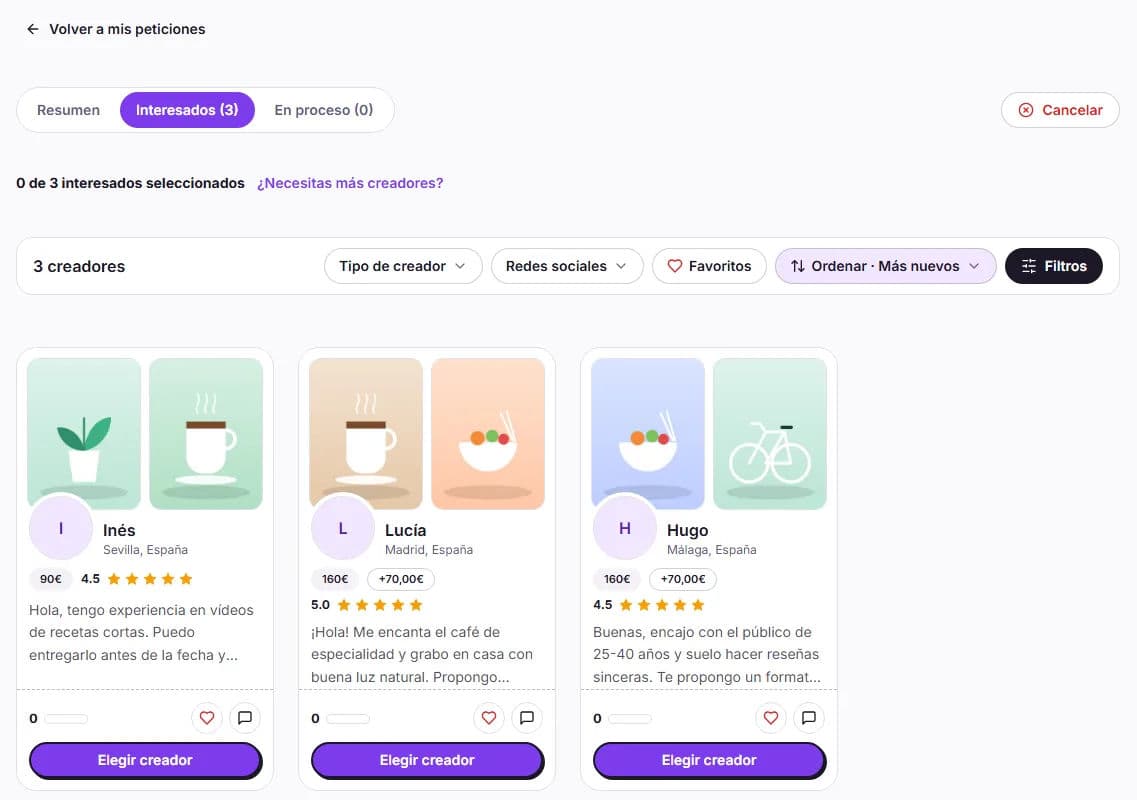
In a campaign, the creator will talk about your brand to their community. In addition to the video, review:
- Their social media accounts: in Social media presence you can see the followers on each account; with Open profile you can see their latest posts, how their community responds to them and whether their audience matches your country and language.
- The portfolio: tone, image and sound quality, and how they present products.
- Their HICARI history: HICARI Score, Acceptance rate, reviews from other brands and response time.
- Application message: it tells you whether they understood the brief and what they propose.
Talk to them before choosing
Click Chat on the candidate’s card to resolve any questions: whether they can meet the delivery date, when they would publish or how they would approach the script. Before you select someone, messages containing emails, phone numbers or links are not sent. More information in Messages with creators.
Confirm your selection
- Click Choose creator on the candidate you want.
- Review the Total per creator in the Confirm selection window.
- If the creator is at a level higher than the minimum or their price per post is higher, you will see the Additional total: your balance is used (Balance applied) and the rest is paid with Stripe (Stripe payment).
- Click Confirm selection (or Confirm and pay, if there is a difference).
The creator receives the notification and starts working. There is no button to reject applications: for those who are not a good fit, simply do not choose them.
Do you need more creators?
Your campaign does not expire: it remains open until you fill all the spots. If you want more, click Do you need more creators? and then Add more creators (up to 100 in total).
If something goes wrong
If a creator does not respond or does not meet what was agreed, you can request the cancellation of that collaboration. We explain how in Problems with a creator. To choose candidates in any public request, also see Choosing creators in a public request.