
My requests: statuses, folders, editing and duplicating
On this page
My requests brings together all your public and private requests, and the videos delivered to you. From here, you can track each collaboration, review deliveries and organize your work.
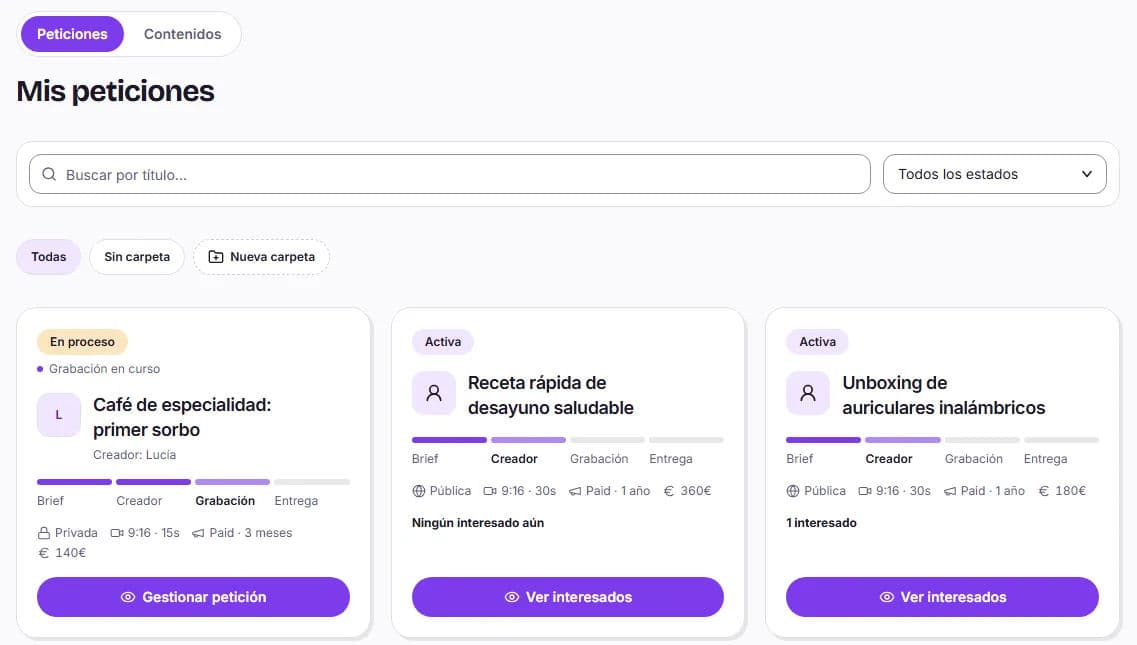
Request statuses
| Status | What it means |
|---|---|
| Draft | It isn't active yet. It is saved automatically, and you can resume it with Continue |
| Active | Published in Opportunities (public) or with the invitation sent (private). Its amount is held from your balance |
| In progress | At least one creator is working on your video |
| Pending review | There is a delivery waiting for you to review |
| Completed | Collaboration approved. For public requests, when all slots have been approved |
You can search by title and filter by status. For private requests, the card also shows how much time is left on the invitation or whether the creator has rejected it.
Inside a request
Public requests have the Summary, Interested, In progress and Completed tabs. In In progress, each creator has their Chat and Manage buttons: from Manage, you can view deliveries, the shipping address, the Paid usage rights and, if necessary, request cancellation.
When a delivery arrives, you review the entire collaboration: Approve collaboration and release payment or Request review with your comments. This includes one round of changes at no extra cost. You have 7 days from delivery to review it, and we will send you a reminder; depending on the terms, if you do not respond, the delivery may be considered approved. All the details are available in video review.
Folders
Create a New folder (and subfolders within it) to organize by brand, campaign or month, and use Move to folder for each request. If you delete a folder, its requests are not deleted: they remain without a folder.
Content tab
In Content, you have all delivered videos in one place, with a search field by title or file name and the Download video button. Find more options in downloading and sharing your videos.
Edit, duplicate, cancel and delete
- Edit request: change the brief of an active request. If the change affects the price, the difference is charged (first from your balance and the rest by card) or returned to your balance. If a creator is already in progress, you cannot change the options that affect the price, but you can change the rest of the brief. The number of creators cannot be reduced; to increase it, use Add more creators.
- Duplicate: creates a draft copy. It is the quickest way to repeat a brief or work with the same creator again.
- Cancel: returns the request to draft while nobody has taken it, and the held balance becomes available again. For a public request, the brief stops appearing in Opportunities and, if you activate it again, it retains the interested creators. For a private request, the creator can no longer see the invitation and receives a notification. Only the person who created it can cancel it.
- Delete: available for drafts and private requests whose invitation was rejected or expired. If any balance remains held, it returns to your available balance.