
Private invitations: 72 hours to respond
On this page
A private invitation is a request that a brand sends only to you after viewing your profile. You have 72 hours to accept or reject it. If you don’t respond on time, the invitation expires and you automatically receive a negative rating.
Where to find them
- In Invitations, with a countdown: The invitation expires in…
- In your Dashboard, on the pending invitations card.
- By email and, if you use the app, by push notification. We’ll send you reminders before it expires.
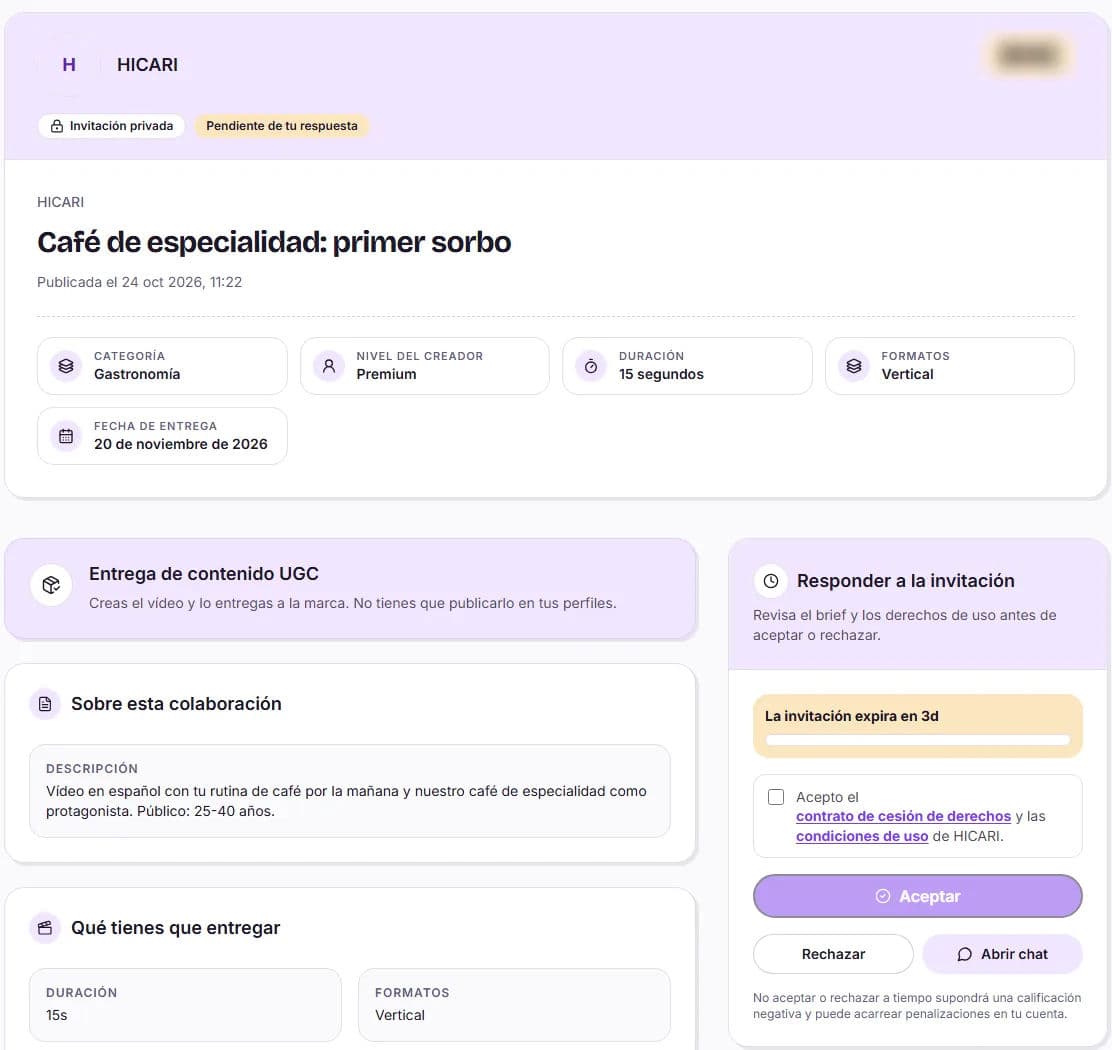
What to review before responding
- What you have to deliver: duration, formats and extra hooks.
- Delivery date: private invitations always allow at least 7 days.
- Usage and rights: organic, paid and its duration. If there is paid usage, private invitations include 3 months; if the brand extends it to 6 months, 1 year or 2 years, you receive the surcharge you have configured.
- Product shipping and location, if applicable.
- Breakdown of your earnings: what you receive in total.
Do you have questions? You can open the chat with the brand before deciding.
Accept or reject
Accept
Click Accept and accept the rights assignment contract and the usage terms. The collaboration moves to My collaborations and the brand receives a notification.
Reject
Click Reject, write the reason (this is required), and click Confirm rejection. The brand gets its balance back and can invite another creator.
If the brand withdraws the invitation
You’ll see This invitation is no longer available. You don’t need to do anything else.
After accepting
- If there is product shipping, fill in your shipping address.
- Talk to the brand via chat to clarify the script or references.
- Deliver before the brief’s deadline: we explain this in Delivering your videos and managing reviews.
Can I negotiate the price?
No. The amount is based on your level and what the brief requests, and you see exactly what you receive before accepting. Prices cannot be negotiated via chat either.
Can I request more time?
Ask the brand via chat before accepting. If the date doesn’t work for you, it’s better to reject on time than deliver late.
How can I stop receiving invitations for a while?
Activate Vacation mode in Portfolio and profile → Settings. While it’s active, you won’t receive invitations and you won’t appear in the catalog. More information in Settings, vacation mode and account closure.