
Extend paid rights
On this page
If you want to continue using a video in ads when its paid period ends, request an extension with Extend paid rights. Choose the number of months, the creator accepts, and you pay with your balance or by card.
When you can extend
- The request is Completed. In a public request with several creators, when all collaborations have been approved.
- The collaboration included paid: in the brief, you selected Paid media or Organic + paid.
- You can request it before or after it expires. Before is better, so you don’t interrupt your ads.
Step by step
Open the collaboration
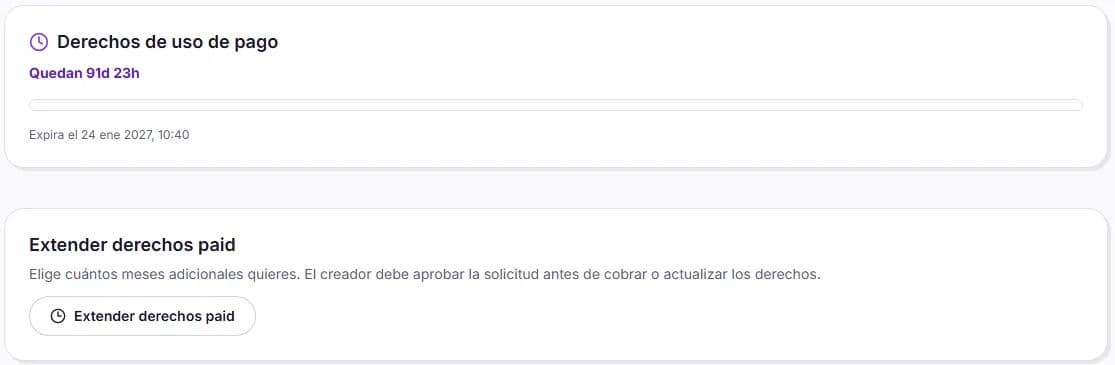
In My requests, open the request and the collaboration with the creator. You’ll see the Paid usage rights bar with the end date.
Click Extend paid rights
Choose one of the proposed durations or enter the Custom months you need, within the range indicated (up to 24 months).
Review the price
Before sending, you’ll see the Price for the client. It depends on the creator’s paid rate and the number of months you choose.
Send the request
Click Send extension request. It will be marked as Pending creator approval: you won’t be charged anything yet.
Pay when the creator accepts
If the creator accepts, the amount is deducted from your available balance and, if it isn’t enough, you pay the remainder by card under Pay outstanding amount. Once the payment is confirmed, you’ll see Extension completed and the new end date.
How the new date is calculated
- If the rights are still valid, the months are added to the current end date. For example, if your paid rights expire on March 1 and you extend them by 6 months before that date, they will expire on September 1.
- If they have already expired, the months are counted from when the extension is applied.
If the creator rejects it
You’ll see Request rejected, sometimes with a note from the creator, and you won’t be charged anything. The video remains available for organic use, but you can’t use it in ads after the end date.
What if the request hasn’t been completed yet?
For private requests, you can choose a longer paid period from the start, in the Usage and timelines step of the brief (6 months, 1 year or 2 years, depending on the creator’s rates). We explain this in paid usage. A subsequent extension is only available once the request has been completed.