
Submit your videos and manage reviews
On this page
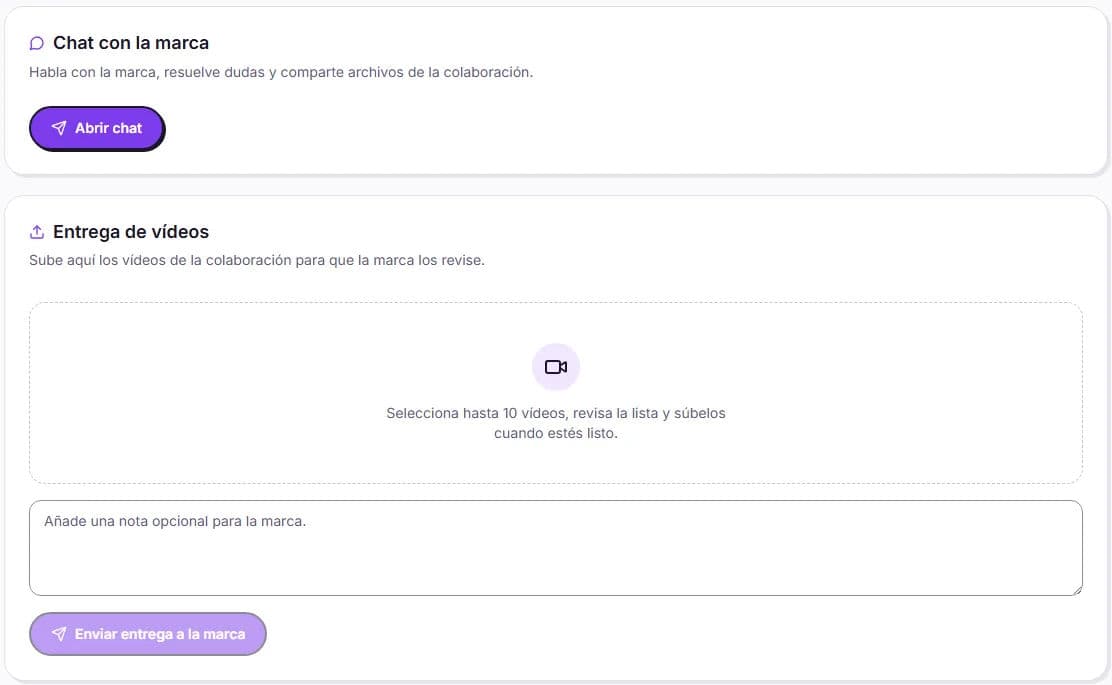
You submit your videos from the collaboration itself, in the Video submission section. The brand reviews the entire collaboration and approves it or requests changes. The first round of changes is included; from the second round onwards, you decide whether to do it free of charge or charge for it.
Before recording
- Read the brief again: duration, formats, extra hooks, script or notes, editing instructions and references.
- If you write the script yourself, send your proposal to the brand in the chat before recording.
- Make a note of the submission date: you can see it in the collaboration and on its card (“Submit by…”).
How to submit
Open the collaboration
In My collaborations (in the app, Colabs), open the In progress collaboration.
Upload your videos
In Video submission, click the upload area (or drag the files) and select up to 10 videos. In the app, you can select them from your Gallery or Photos. If you want, add a note for the brand.
Submit the delivery
Review the list and click Submit delivery to the brand. The brand receives a notification and your submission remains under review.
| Limit | Value |
|---|---|
| Videos per submission | Up to 10 |
| Submissions per collaboration | Up to 20 |
| Size per video | Up to 5 GB |
| Duration per video | Up to 60 minutes |
If the brand requests changes
The brand reviews the entire collaboration and chooses whether to approve it or request a review with comments. You will see the notification The brand requested changes. Upload a new version. and the card will move to Correct submission. All requested changes appear under Review requests.
| Review | What happens |
|---|---|
| 1st round of changes | Included: you apply the changes and upload a new submission |
| From the 2nd round onwards | You decide: Accept free of charge or Request payment |
If you choose Request payment, you will see the amount you will receive and the brand will confirm payment before you upload the new submission. This amount is added to your wallet when it is approved.
When the brand approves
The brand has 7 days from your submission to review it, and we send them a reminder. Once they approve it, the collaboration moves to Completed and the amount is added to your Available balance, in the Wallet.
Afterwards, you can still upload extra videos, for example a version you agreed on together: they are marked as Additional, do not cost the brand anything and do not go through review.
Deadlines and delays
- The brand sets the submission date in the brief; for private invitations, it is at least 7 days.
- If you are going to be late, let the brand know in the chat as soon as possible.
- If you do not submit, the brand may request that your collaboration be cancelled. If our team approves it, it is cancelled without payment and the chat is closed.
- You cannot cancel a collaboration using a button: if a problem comes up, contact Support.